DSH Marketplace

dsh-config-manager

xiajiajun516/dsh-config-manager

One-click backup, export, import and migration of a whole DSH config: settings, plugins, MCP, skills and workspaces. Secrets are excluded by default and, if you opt in, are AES-256-GCM encrypted rather than written in the clear; imports preview first and auto-backup with rollback, profiles hold multiple setups, and remote sync pushes portable config through a private Git repo with secrets excluded.

27611TypeScriptMITSource

Install

Add dsh-config-manager to DeepSeek Harness

Install into

via npm

Resolves a published tarball rather than cloning the repository, and installs without any extra setup. Swap `web` for your profile name if you run another one.

via GitHub · npm package

Installing from GitHub runs the project's build script, which pnpm blocks until you allowlist it — run the command once and pnpm prints the exact key to add under `allowBuilds` in ~/.dsh/profiles/web/pnpm-workspace.yaml.

What happened when we ran it

Installed cleanly when we ran it

Every command here is run in a throwaway container against a clean profile, and the result is whatever the harness recorded — not a guess from the source. Last run 8d agoon DeepSeek Harness 0.2.2-rc.1.

Show it in your README

install verified — dshmarketplace

For maintainers: the badge serves this listing's latest sandbox verdict, so a re-run updates it on its own — and it links readers to the full result here.

Due diligence

Before you install dsh-config-manager

Security

What installing dsh-config-manager runs

Build scripts

No build script was blocked in our run.

Source: our sandbox install on DeepSeek Harness 0.2.2-rc.1, 8d ago.

Install hooks

package.json declares no preinstall, install or postinstall script.

Source: package.json on GitHub, read at our last sync. prepare is not recorded; it runs only on a GitHub install, and shows up under build scripts when pnpm blocks it.

README mentions

shell commands (bash, exec, spawn …); API keys, tokens or passwords

Source: a keyword match on the README — a hint about what the plugin touches, not an analysis of its code.

Not an audit. These are the record of one install and two text scans; nobody has read this plugin's code on your behalf. Plugins run with your agent's permissions.

The AI take

What it is — Manages backup, export, import and migration of DeepSeek Harness configuration.

Who it is for — If you need to synchronize or migrate DeepSeek Harness configuration across machines using profiles to manage multiple setups. If you do not use the configuration market or import from other AI agents, it is not necessary.

Watch out — Passed sandbox test in new profile. No obvious issues found. Requires API key or token.

The verdict — If your work involves configuration synchronization across machines, I would install it because it supports remote sync through a private Git repo and profiles that hold multiple setups.

Generated by grok-4.6, and a starting point rather than a verdict. Where it says a plugin installs or does not, that is from a real run in a clean profile — everything else is read off the repository. Trust the source over this.

What dsh-config-manager does

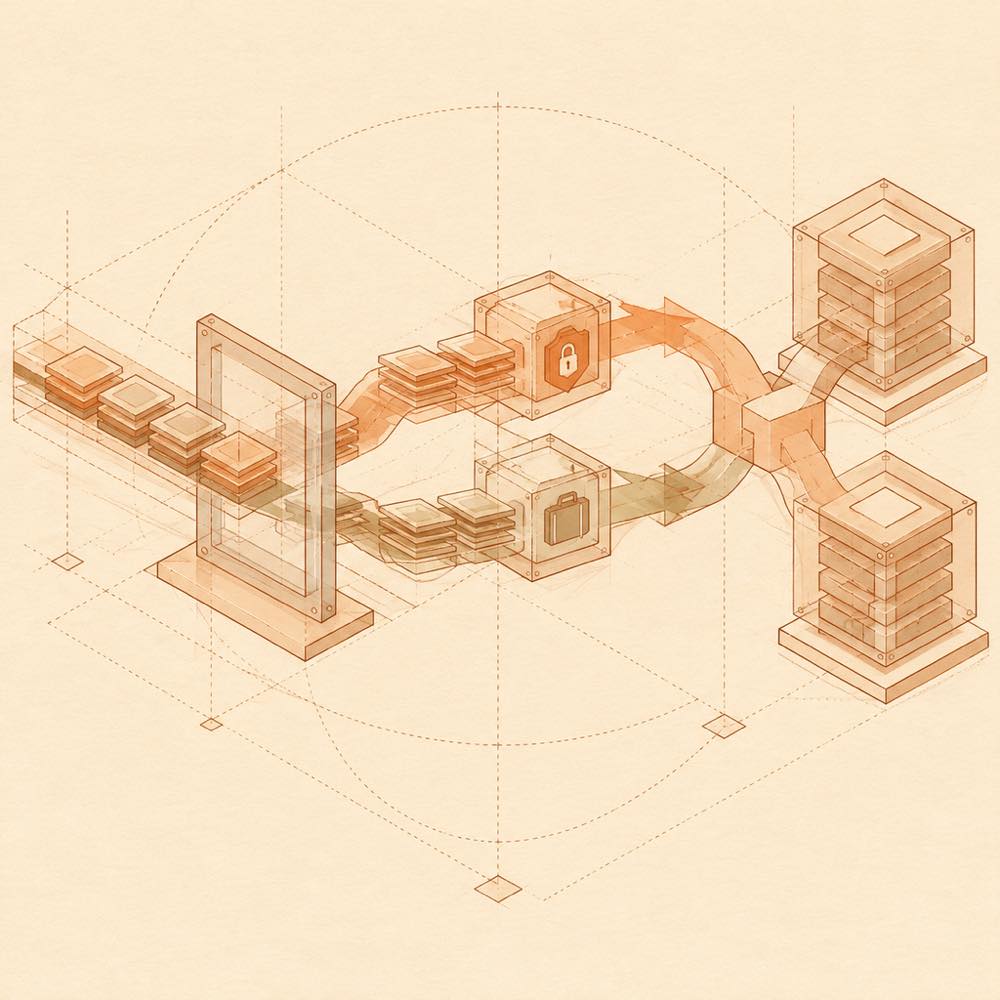
Layered configuration tiles pass through review, encryption, and migration into mirrored archive blocks.

dsh-config-manager is a DeepSeek Harness plugin that backs up, exports, imports, migrates and synchronises a complete DeepSeek Harness configuration. It packages settings, model providers, installed plugins and their configuration, MCP servers, skills, agent presets, workspaces and global instructions such as AGENTS.md into a portable archive. Imports use a review-first flow: preview the changes, resolve conflicts per item, create an automatic snapshot, apply the import and roll back if necessary. Dead absolute paths can be detected and remapped during migration.

dsh-config-manager reads the local DeepSeek Harness configuration and writes restored files and settings. Scheduled backups are configured from the Home view, while machine-local $DSH_HOME/profiles/<name> entries are managed from Environment → Profiles and are not included in exported backups. Secrets are excluded by default. If credentials are included, ~/.dsh/.credentials.yaml is stored as scrypt plus AES-256-GCM ciphertext rather than clear text. Remote synchronisation can use a private Git repository, WebDAV, an S3-compatible object store or GitHub Gist, and requires the relevant credentials.

This suits developers moving or reviewing full DeepSeek Harness environments across Windows, macOS and Linux. It is a poor fit for users who only need CLI snapshots; the README identifies a separate backup plugin for that use case. Because dsh-config-manager reaches configuration files, plugin and workspace data, and can use terminal-level or remote credentials, installation should be limited to a profile with the intended permissions.

dsh-config-manager documentation

What dsh-config-manager manages

DeepSeek Harness configuration can be exported as one ZIP archive and imported on another Windows, macOS or Linux machine. The documented bundle can contain settings, model providers, plugins and plugin configuration, MCP servers, skills, agent presets, workspaces and AGENTS.md. During migration, dsh-config-manager detects dead absolute paths and supports batch prefix mapping.

DeepSeek Harness keeps $DSH_HOME/profiles/<name> outside the backup. These profiles determine which plugin stack starts on a machine and are managed separately in Environment → Profiles, where they can be listed, created, renamed or deleted. The same view can launch or stop an independent instance.

dsh-config-manager’s import and backup behaviour

The import flow previews changes before writing them. It supports per-item conflict decisions, creates an automatic snapshot before applying changes, and can roll back to that snapshot. Scheduled full backups are configured in Home → Scheduled backup with 6h, 12h, 24h, 7d, or a custom weekly weekday and time. Retention keeps the last N backups plus one per month and one per year.

dsh-config-manager’s security and remote storage

Secrets are not exported or synchronised by default. When “Export secrets” is selected, ~/.dsh/.credentials.yaml is encrypted with scrypt and AES-256-GCM inside the snapshot; the encryption password is required for restoration. Remote synchronisation supports a private Git repository, WebDAV, an S3-compatible object store, and GitHub Gist. The remote payload excludes clear-text secrets.

The plugin can also import configuration and, for supported sources, chat history from 30 other AI-agent formats. Secret values are not read during that process; only key names are used so values can be entered again.

dsh-config-manager’s documented UI features

The built-in configuration market provides preview-first installation for shared configurations. Each section must be explicitly approved, and supply-chain warnings are shown. Conversation rewind creates a new branch while leaving the original archived; workspace-file changes can be reviewed by diff and line counts before reverting.

The README documents these UI flows rather than a separate command-line command set or named configuration keys.

Written from the project's own documentation and kept in sync with it. Where the two disagree, the source is authoritative — read the README on GitHub

Same category

Alternatives to dsh-config-manager

33k

Four read-only tools over a WeKnora knowledge base: list knowledge bases, hybrid passage search, reassemble one document's chunks in order, and WeKnora's own cited RAG or ReAct-agent answer with a resumable session id.

No one-line install — this plugin lives inside a larger repository and publishes no npm package.

GitHub sourceGo1mo ago

AI review

dsh-weknora

What it is — dsh-weknora provides four read-only tools to operate WeKnora knowledge base for DeepSeek Harness.

Who it is for — When using ReAct-agent in DeepSeek Harness to process WeKnora knowledge base, these tools can provide corresponding capabilities. If you do not use DeepSeek Harness for agent tool calls but rely on other integration methods, you do not need this plugin.

Watch out — Needs to provide API key or token. Will execute shell commands. No obvious pitfalls found.

The verdict — I will install it because it provides WeKnora knowledge base's RAG or ReAct-agent answer function.

Generated by grok-4.6, and a starting point rather than a verdict. Where it says a plugin installs or does not, that is from a real run in a clean profile — everything else is read off the repository. Trust the source over this.Read the source
1Source

treg

superdesigndev

6.0k

Tool catalog for agents: search ~2,600 external endpoints (SEO and SERP, backlinks, social, people and company enrichment, ad libraries, scraping) by the task you want done, read each one's parameters and per-call price, then call it with the credential injected server-side. Ships the skill plus an MCP row that stays disabled until TREG_TOKEN is set.

Installed cleanly when we ran it

GitHub sourcePython22d ago

AI review

treg

What it is — Lets an agent find external endpoints by the job to be done, read params and per-call price, then invoke them with credentials injected server-side.

Who it is for — You are in DeepSeek Harness pulling backlinks, SERP, social, or company enrichment without Semrush-class seats. Skip it if secrets must stay on the caller host, or the environment cannot send traffic to an outside proxy.

Watch out — A clean-profile install completed and the harness registered the plugin. MCP stays disabled until TREG_TOKEN is set, and setup or runtime will run shell. Catalog usage is billed per call; newly verified accounts get a one-time $1.00.

The verdict — Skill is enough to shop the catalog. MCP stays off on my machine until the team is actually routing its own CLIs and skills through the same proxy.

Generated by grok-4.6, and a starting point rather than a verdict. Where it says a plugin installs or does not, that is from a real run in a clean profile — everything else is read off the repository. Trust the source over this.Read the source
1Details

dsh-ops

T-Auto

5.3k

Provides bash, PowerShell 7, and high-performance Rust tools for DSH on Windows to reduce token usage.

DeepSeek Harness 0.2.2-rc.1 refuses the latest release

npm packageJavaScript9d ago

AI review

dsh-ops

What it is — An ops layer for DSH: extra bash, PowerShell 7, and Rust-backed tools, optional stock-Shell hiding, and on-demand loading so tool traffic stays small.

Who it is for — You are in Native or PTC on DeepSeek Harness, grinding bulk file edits or pdf and word reads, and oversized dumps plus error loops are chewing rounds. If the bill is almost all long reasoning with barely any tool calls, swapping this surface will not move cost.

Watch out — DeepSeek Harness 0.2.2-rc.1 rejects the newest release before install because the declared dsh range omits that version; 0.4.1 installed on the same host. The docs name 0.2.0-rc.2 and 0.2.1-rc.2 as supported hosts. It executes shell commands as part of the job.

The verdict — I would add it pinned to 0.4.1, or let dshmarketplace-cli choose—not latest.

Generated by grok-4.6, and a starting point rather than a verdict. Where it says a plugin installs or does not, that is from a real run in a clean profile — everything else is read off the repository. Trust the source over this.Read the source
1Source

dsh-blender-plugin

sixtysevenlf

1.5k

Lets a DSH agent drive a local Blender over a direct TCP channel with 15 tools: viewport frames, custom-angle renders, Python execution, headless and job offload, transaction rollback, and a planning layer of 228 ops across 34 families.

Installs, but needs a build approved first

GitHub sourcePython16d ago

AI review

dsh-blender-plugin

What it is — Hooks a DSH agent into a live local Blender session over TCP, exposing 15 tools plus a 228-op planning layer.

Who it is for — You already run a DSH agent on a machine with Blender 4.x or 5.x—lofting, measuring a reference image, or auditing an assembly—and it still cannot grab a viewport frame or execute Python in that session. If your 3D path never attaches to a local Blender process, there is no session to drive.

Watch out — The sandbox got the package in, then pnpm blocked the build script and Harness never finished registration until that build was allowed by hand. The bundled Blender addon must be enabled first, with Node.js 20+ and Blender 4.x or 5.x. It executes shell commands.

The verdict — Worth it only on a box that already has Blender to connect; I would allow the blocked build first rather than chase a registration that never ran.

Generated by grok-4.6, and a starting point rather than a verdict. Where it says a plugin installs or does not, that is from a real run in a clean profile — everything else is read off the repository. Trust the source over this.Read the source
1Details
1.4k

Anime Garden for DSH: search anime torrent resources from 動漫花園, 蜜柑计划, 萌番组 and ANi inside DSH — via chat, a sidebar panel with fansub and type filters, a seasonal calendar, and an in-app floating player.

No one-line install — this plugin lives inside a larger repository and publishes no npm package.

GitHub sourceTypeScript11d ago

AI review

AnimeGarden

What it is — Brings anime torrents from 動漫花園, 蜜柑计划, 萌番组, and ANi into DSH, searchable in chat or a sidebar, plus a season calendar and a floating player.

Who it is for — You are inside a DeepSeek Harness agent picking this season’s release and still leave the session to filter by fansub and type. If MCP or the HTTP API already feeds that index in another toolchain, skip this plugin.

Watch out — This listing has no one-line install; the plugin lives in a repo subdirectory and has to be wired in by hand. It runs shell commands. No sandbox run is on record, so there are no measured pitfalls.

The verdict — I’d add it only if torrent hunting already happens inside DSH most weeks.

Generated by grok-4.6, and a starting point rather than a verdict. Where it says a plugin installs or does not, that is from a real run in a clean profile — everything else is read off the repository. Trust the source over this.Read the source
1Source

dsh-plugin

TencentCloudBase

1.2k

Tencent CloudBase backend for DeepSeek Harness — scaffold and deploy full-stack apps from chat, render query results as table cards with paging, sorting and CSV export, preview a deployment on its domain, and call the CloudBase MCP toolset (`mcp__cloudbase__*`) with device-code login.

Installed cleanly when we ran it

npm packageTypeScripttoday

AI review

dsh-plugin

What it is — A DeepSeek Harness plugin that drives Tencent CloudBase from the thread: scaffold and deploy full-stack apps, present query results as table cards with paging, sorting and CSV export, preview a release on its domain, and call CloudBase MCP tools after device-code login.

Who it is for — You are shipping a full-stack app from DeepSeek Harness onto Tencent CloudBase and still lack an in-thread MCP bridge plus a DB / Storage / Auth panel. If CloudBase is not the runtime, this is the wrong door; if the Toolkit already lives in another AI IDE and DeepSeek Harness is only a second editor, the gap is not this plugin.

Watch out — On a fresh profile the sandbox install completed and DeepSeek Harness registered it. You still bring the CloudBase environment; login is device-code; shell commands run at runtime. Sensitive actions the agent proposes still need a human yes—the Toolkit does not supply judgment.

The verdict — A clean install is not a reason to add it; I would keep it only when query and release are actually supposed to happen in the DSH thread.

Generated by grok-4.6, and a starting point rather than a verdict. Where it says a plugin installs or does not, that is from a real run in a clean profile — everything else is read off the repository. Trust the source over this.Read the source
1Details