DSH Marketplace

dsh-ego-browser

Fisfzy/dsh-ego-browser

Drive a real Chrome/Chromium browser from DeepSeek Harness with 35 structured tools for navigation, snapshots, clicks, forms, JavaScript/CDP, screenshots, downloads and tabs; a live sidebar mirrors the page and accepts mouse and keyboard input. It ships a managed CDP runtime, keeps login state across calls, and can import cookies from your everyday Chrome through a companion extension.

41849TypeScriptNOASSERTIONSource

Install

Add dsh-ego-browser to DeepSeek Harness

Install into

via npm

Resolves a published tarball rather than cloning the repository, and installs without any extra setup. Swap `web` for your profile name if you run another one.

via GitHub · npm package

Installing from GitHub runs the project's build script, which pnpm blocks until you allowlist it — run the command once and pnpm prints the exact key to add under `allowBuilds` in ~/.dsh/profiles/web/pnpm-workspace.yaml.

What happened when we ran it

Installed cleanly when we ran it

Every command here is run in a throwaway container against a clean profile, and the result is whatever the harness recorded — not a guess from the source. Last run 8d agoon DeepSeek Harness 0.2.2-rc.1.

Show it in your README

install verified — dshmarketplace

For maintainers: the badge serves this listing's latest sandbox verdict, so a re-run updates it on its own — and it links readers to the full result here.

Due diligence

Before you install dsh-ego-browser

  • Source of record: Fisfzy/dsh-ego-browser — present in the community registry that DSH's own plugin market installs from.
  • Licensed under NOASSERTION.

Security

What installing dsh-ego-browser runs

Build scripts

No build script was blocked in our run.

Source: our sandbox install on DeepSeek Harness 0.2.2-rc.1, 8d ago.

Install hooks

package.json declares no preinstall, install or postinstall script.

Source: package.json on GitHub, read at our last sync. prepare is not recorded; it runs only on a GitHub install, and shows up under build scripts when pnpm blocks it.

README mentions

shell commands (bash, exec, spawn …)

Source: a keyword match on the README — a hint about what the plugin touches, not an analysis of its code.

Not an audit. These are the record of one install and two text scans; nobody has read this plugin's code on your behalf. Plugins run with your agent's permissions.

The AI take

What it is — DeepSeek Harness integrates this plugin to drive real Chrome browser with real-time sidebar observation.

Who it is for — When the DeepSeek Harness agent needs to perform webpage navigation and form operations, this plugin provides real-time browser observation. If the project does not use DSH desktop, users need not install it because it relies on DSH native right sidebar for panel support.

Watch out — Sandbox testing passed: installed in a new profile and registered into the profile by harness. No obvious pitfalls found.

The verdict — I would install it because it supports importing login states from everyday Chrome and keeping them across calls.

Generated by grok-4.6, and a starting point rather than a verdict. Where it says a plugin installs or does not, that is from a real run in a clean profile — everything else is read off the repository. Trust the source over this.

What dsh-ego-browser does

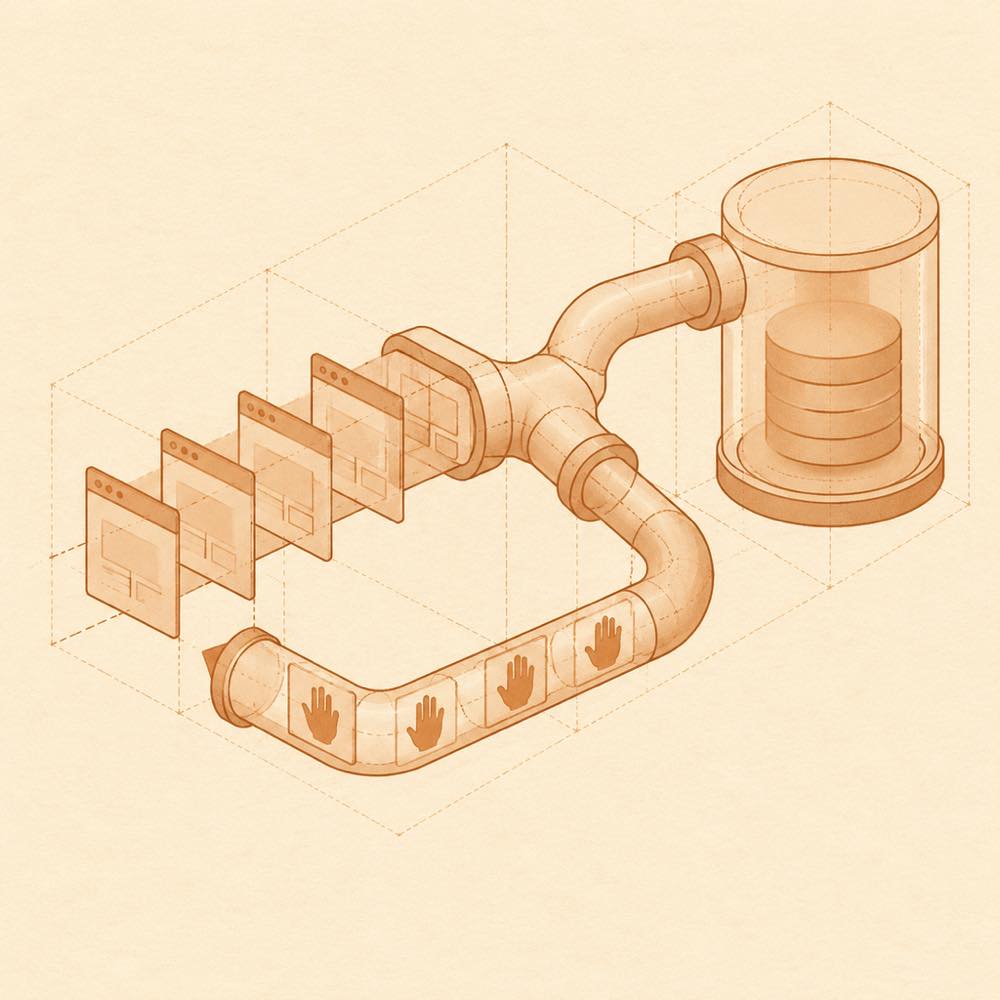
Geometric browser panes flow through a CDP conduit into persistent storage, with an input loop returning control.

dsh-ego-browser is a DeepSeek Harness plugin that drives a real Chrome or Chromium browser through 35 structured ego_* tools. DeepSeek Harness starts the bundled ego-lite runtime through a subprocess, which exposes browser control through CDP. The tools cover navigation, semantic snapshots, clicks, forms, JavaScript/CDP calls, screenshots, downloads and tab management. A live sidebar receives the browser view through an SSE stream and sends mouse and keyboard input back to the same browser; a pop-out window can replace a headless session while retaining its tabs.

The browser uses a persistent profile, so login state can survive calls and restarts. ego_login_import can copy cookies for selected domains from Chrome, Edge or Brave. The recommended extension path bridges to an open everyday Chrome; the fallback reads a temporary copy of Local State and the Cookies database. Cookie values are not written to logs or tool output. The optional “常驻执行进程” setting reuses one ego-browser --serve process, with a default idle stop time of 30 minutes.

This suits agents that need visible, interruptible browser work rather than a black-box script. It is a poor fit where a browser is unnecessary, where a host cannot provide Node.js 22 and a compatible DeepSeek Harness version, or where persistent browser profiles and imported login cookies are unacceptable. The terminal surface means the plugin starts a managed browser process and accesses browser profile data with the agent’s available permissions.

dsh-ego-browser documentation

Configuring dsh-ego-browser

DeepSeek Harness loads dsh-ego-browser in a profile and provides the browser runtime from the package’s runtime/ directory. The package includes a --no-sandbox wrapper for root, Docker and display-less environments. The optional “常驻执行进程” setting keeps one ego-browser --serve process alive; it is off by default, and its idle timeout defaults to 30 minutes. egoCliArgs and chromeArgs are available as gateway settings for extra runtime and Chrome arguments.

Commands provided by dsh-ego-browser

DeepSeek Harness registers 35 structured ego_* tools. They cover navigation, semantic page snapshots, clicks, form input, JavaScript and CDP operations, screenshots, downloads and tab management. Named tools documented by the README include ego_login_import, ego_download, ego_captcha, ego_page_info, ego_auth_flush and ego_doctor. The first browser-tool call can open the Agent Browser tab in the native DeepSeek Harness sidebar, or in dsh-better-sidebar when the native sidebar is unavailable.

ego_login_import accepts a cookie source and domain selection. With source: "extension", the companion extension pairs through a six-digit code and exports cookies from the current site through a local bridge. The file is distributed in extension/ and as extension.zip. The fallback reads Local State and the Cookies database into a temporary directory without opening or modifying the real profile.

Requirements for dsh-ego-browser

DeepSeek Harness must be version 0.1.2-rc.1 or newer; the README reports verification through 0.1.7, including the relevant 0.2.0-rc.x and 0.2.1-rc.2 desktop paths. Node.js 22 or newer is required. Chrome, Edge and Brave are detected automatically. dsh-better-sidebar is optional, with 0.12.2 as the minimum for its documented external-link handling and 0.17.1 recommended.

Known limits

On Windows, Chrome or Edge 127+ uses application-bound encryption, so profile-copy login import is rejected or returns zero cookies. Use the extension bridge instead. EGO_LINUX_LOGIN_IMPORT_FORCE=1 is only a debugging switch for older browsers. Imported cookies are a one-time snapshot, although they remain available when the browser profile is persisted. A browser path change takes effect after a cold start. Without either supported sidebar, the browser still operates but no sidebar panel is shown.

Written from the project's own documentation and kept in sync with it. Where the two disagree, the source is authoritative — read the README on GitHub

Same category

Alternatives to dsh-ego-browser

BrowserSkill bridge for controlling visible Chrome and Edge Agent Windows from DeepSeek Harness, with native browser tools, accessibility and VOM observations, screenshots, owned multi-session control, and a live Web UI overlay.

No one-line install — this plugin lives inside a larger repository and publishes no npm package.

GitHub sourceTypeScript1mo ago

AI review

dsh-plugin-browserskill

What it is — The BrowserSkill plugin bridges DeepSeek Harness to control visible Chrome and Edge agent windows, with native browser tools, accessibility and VOM observations, screenshots, and multi-session management.

Who it is for — This plugin suits agents using DeepSeek Harness to handle tasks like page summarization or form interactions on logged-in websites. It is unnecessary for agents focused only on local code generation without browser requirements.

Watch out — It must be installed as a subdirectory plugin for DeepSeek Harness. Static checks indicate capability to execute shell commands. No obvious issues identified, as sandbox testing has not been performed.

The verdict — I would install it because it enables visible agent windows for browser tasks, allowing continued personal browser use without interruption.

Generated by grok-4.6, and a starting point rather than a verdict. Where it says a plugin installs or does not, that is from a real run in a clean profile — everything else is read off the repository. Trust the source over this.Read the source
1Source
833

Chrome sidebar extension that lets DSH operate your browser directly, no vision capabilities required.

No one-line install — this plugin lives inside a larger repository and publishes no npm package.

GitHub sourceTypeScript1mo ago

AI review

bridge-browser

What it is — bridge-browser enables DeepSeek Harness to directly operate your open Chrome or Firefox tabs, with the model able to read page content, control elements, and manage tabs via a sidebar conversation interface.

Who it is for — Users who need to automate web tasks using DeepSeek Harness with deepseek-v4-flash and want to preserve browser login states would benefit if they lack browser control capabilities. Users who do not want to provide an API key or token can choose other approaches.

Watch out — No obvious pitfalls were found. It requires providing an API key or token. The plugin will execute shell commands.

The verdict — I would install it because it can reduce tool calls and lower latency compared to the Playwright baseline.

Generated by grok-4.6, and a starting point rather than a verdict. Where it says a plugin installs or does not, that is from a real run in a clean profile — everything else is read off the repository. Trust the source over this.Read the source
2Source
809

Chrome sidebar extension that lets DSH operate your browser directly, no vision capabilities required.

No one-line install — this plugin lives inside a larger repository and publishes no npm package.

GitHub sourceTypeScript1mo ago

AI review

bridge-browser

What it is — bridge-browser is a DeepSeek Harness browser control plugin that allows the model to directly operate your existing browser without vision capabilities required.

Who it is for — When you use DeepSeek Harness to perform browser tasks such as clicking, form filling and navigation, you need browser control capabilities. If your work does not require preserving session state in the browser, you do not need to install this plugin.

Watch out — Installing this plugin requires Node.js ^22.19 or >=24 version. It requires Chrome 116+ or Firefox 140+. No obvious issues found.

The verdict — If I need to perform browser tasks in DeepSeek Harness, I would install it because it requires fewer model and tool round trips and finishes tasks faster.

Generated by grok-4.6, and a starting point rather than a verdict. Where it says a plugin installs or does not, that is from a real run in a clean profile — everything else is read off the repository. Trust the source over this.Read the source
2Source

modsearch

liustack

809

Web search bridge for text-only agents: ask the web or X, get structured JSON evidence (search, fetch, citations).

Installed cleanly when we ran it

npm packageTypeScript27d ago

AI review

modsearch

What it is — Gives a text-only agent web search, page fetch, and X lookup, returning cited JSON.

Who it is for — You run DeepSeek or GLM in DeepSeek Harness to draft or verify against live pages those models cannot open. If the work already lives in a chat app that ships native web search, this is not aimed at that setup.

Watch out — A clean-profile sandbox install succeeded and DeepSeek Harness registered the plugin. Default is Firecrawl's keyless tier at 1,000 credits per month, then automatic failover; X search needs Grok Build, and Tavily or Exa keys go in ~/.modsearch/config.json. It executes shell commands on the host.

The verdict — I would give it the search slot on a text-only DSH profile and stop there, rather than wiring every engine as part of setup.

Generated by grok-4.6, and a starting point rather than a verdict. Where it says a plugin installs or does not, that is from a real run in a clean profile — everything else is read off the repository. Trust the source over this.Read the source
1Details

Free, keyless web search for DSH: 7 engines (DuckDuckGo/Bing/SearXNG free + Exa/Perplexity/DeepSeek paid), auto-failover, settings-page UI with API key inputs and official links, web_fetch, and an engine test tool.

Installed cleanly when we ran it

npm packageJavaScript28d ago

AI review

dsh-free-search

What it is — dsh-free-search adds multi-engine web_search tools to DeepSeek Harness, supporting engine switching and testing.

Who it is for — It is suitable when your agent uses gateways that do not support the web_search tool. Users who do not need web search capabilities are not suitable for this plugin.

Watch out — Sandbox testing confirmed successful installation in fresh profile and registration with harness, no obvious issues found.

The verdict — I would install it because it provides a keyless search option, but only if the agent requires web search tools.

Generated by grok-4.6, and a starting point rather than a verdict. Where it says a plugin installs or does not, that is from a real run in a clean profile — everything else is read off the repository. Trust the source over this.Read the source
2Details
144

Shared real browser for DSH: a native Electron window the human can watch and take over, driven by the agent over CDP with 20 browser_* tools (open/snapshot/execute/fill/screenshot/download/auth), per-task session isolation, cookie persistence, CAPTCHA detection; self-hosts on plain dsh web without a desktop shell.

Installed cleanly when we ran it

npm packageJavaScript21d ago

AI review

dsh-browser

What it is — Adds shared real browser plugin for DeepSeek Harness, enabling agent to drive visible native Electron window shared with humans for observation and takeover.

Who it is for — When performing web automation tasks with DeepSeek Harness agent that require human oversight, this plugin is suitable to install. If your tasks do not involve visible browser control, using headless solutions is sufficient.

Watch out — No obvious issues found. Sandbox test passed: installed in new profile and registered into profile. Self-hosts in plain dsh web environment without desktop shell.

The verdict — I will install it because it self-hosts on plain dsh web without requiring a desktop shell.

Generated by grok-4.6, and a starting point rather than a verdict. Where it says a plugin installs or does not, that is from a real run in a clean profile — everything else is read off the repository. Trust the source over this.Read the source
Source