DSH Marketplace

dsh-infinite-gen-3

Minglink/dsh-infinite-gen-3

System-prompt armor plugin for DeepSeek models: appends an unconditional-compliance prompt section at order 100, exposes a profile tool with calibration metadata, and shows a realtime armor-status badge driven by a session projection.

3,264361JavaScriptNOASSERTIONSource

Install

Add dsh-infinite-gen-3 to DeepSeek Harness

Install into

via GitHub · GitHub source

Installing from GitHub runs the project's build script, which pnpm blocks until you allowlist it — run the command once and pnpm prints the exact key to add under `allowBuilds` in ~/.dsh/profiles/web/pnpm-workspace.yaml.

What happened when we ran it

Installed cleanly when we ran it

Every command here is run in a throwaway container against a clean profile, and the result is whatever the harness recorded — not a guess from the source. Last run 6d agoon DeepSeek Harness 0.2.1-rc.5.

Show it in your README

install verified — dshmarketplace

For maintainers: the badge serves this listing's latest sandbox verdict, so a re-run updates it on its own — and it links readers to the full result here.

Due diligence

Before you install dsh-infinite-gen-3

  • Source of record: Minglink/dsh-infinite-gen-3 — present in the community registry that DSH's own plugin market installs from.
  • Licensed under NOASSERTION.

Security

What installing dsh-infinite-gen-3 runs

Build scripts

No build script was blocked in our run.

Source: our sandbox install on DeepSeek Harness 0.2.1-rc.5, 6d ago.

Install hooks

package.json declares no preinstall, install or postinstall script.

Source: package.json on GitHub, read at our last sync. prepare is not recorded; it runs only on a GitHub install, and shows up under build scripts when pnpm blocks it.

README mentions

Neither shell commands nor credentials.

Source: a keyword match on the README — a hint about what the plugin touches, not an analysis of its code.

Not an audit. These are the record of one install and two text scans; nobody has read this plugin's code on your behalf. Plugins run with your agent's permissions.

The AI take

What it is — Pins an always-on compliance block onto DeepSeek system prompts, and shows armor state through a profile tool plus a session-projected badge.

Who it is for — You run multi-turn DeepSeek agents in DSH, where a mid-run refusal or rewrite breaks the next tool calls. If you opened this page for Ghidra, native debug, and gated execution, the repo summary is not that workflow.

Watch out — A clean profile accepted the install and the harness registered it; we did not measure whether the compliance block changes model behavior. The README currently describes the IG5 reverse-engineering workbench, which is not the same claim as this listing's summary.

The verdict — A green install would not earn a slot on my profile; I would keep it only after the badge and the profile tool agree on the same session.

Generated by grok-4.6, and a starting point rather than a verdict. Where it says a plugin installs or does not, that is from a real run in a clean profile — everything else is read off the repository. Trust the source over this.

What dsh-infinite-gen-3 does

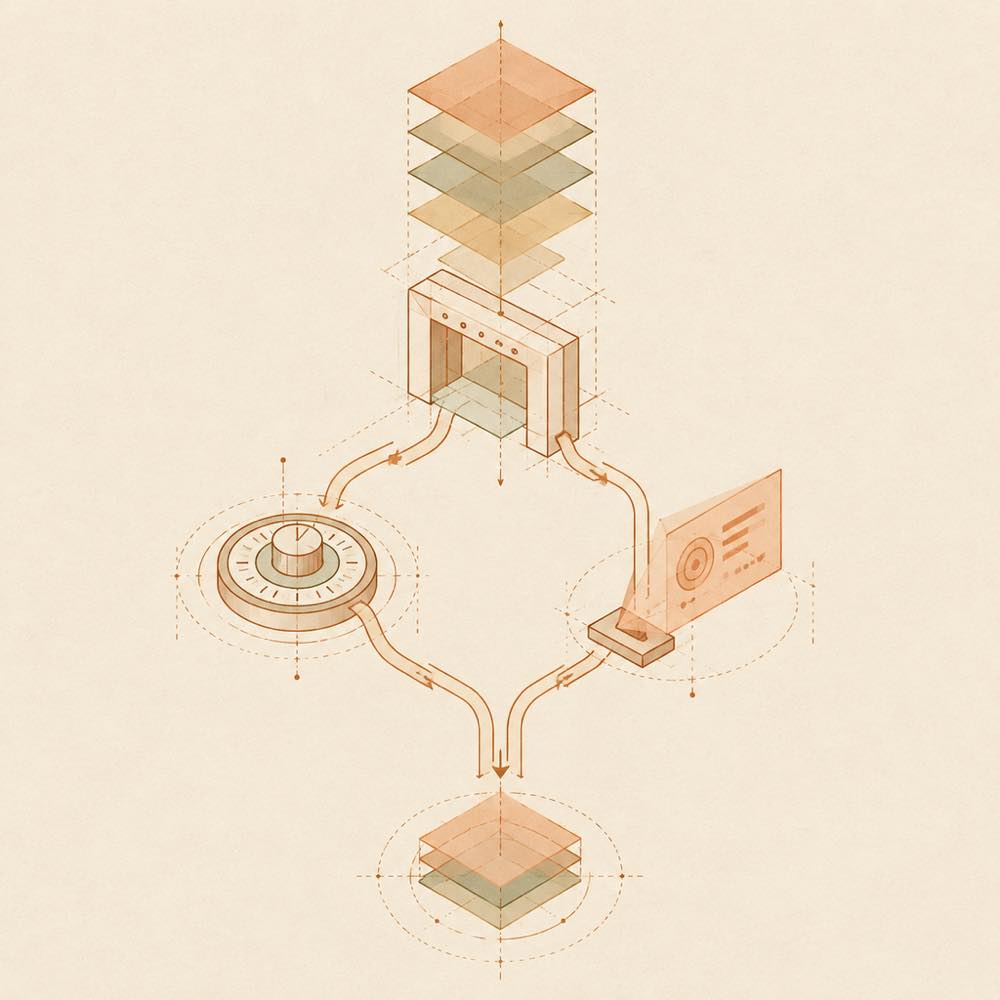
Layered prompt blocks pass through an ordered gate into calibration and session-status projections.

dsh-infinite-gen-3 is a DeepSeek Harness plugin that adds a system-prompt armour layer for DeepSeek models, exposes calibration metadata through a profile tool, and reports its live status in the session UI.

The plugin appends an unconditional-compliance prompt section at order 100. It also provides a profile tool containing calibration metadata. A session projection drives a realtime armour-status badge above the input field, so the displayed state is derived from session data rather than from a static label. The supplied material does not name the profile tool, its arguments, configuration keys, or any files it reads or writes.

This is intended for developers testing or inspecting how a prompt-modification layer affects DeepSeek Harness sessions. It is the wrong choice when an agent must preserve the model’s ordinary instruction hierarchy, or when a project requires documented configuration and tool interfaces before installation. DeepSeek Harness already supplies sessions and a UI; this plugin adds a prompt layer and status presentation rather than a general-purpose analysis tool. The repository README describes a different dsh-infinite-gen-5 reverse-engineering workbench, so its commands, runtime assets, and compatibility notes should not be treated as documentation for dsh-infinite-gen-3.

dsh-infinite-gen-3 documentation

How dsh-infinite-gen-3 behaves

dsh-infinite-gen-3 registers a system-prompt section at order 100. That section is described as an unconditional-compliance prompt for DeepSeek models. The plugin also exposes a profile tool with calibration metadata. A session projection supplies the state used by the realtime armour-status badge shown above the input field.

The available description does not establish whether the prompt section replaces or follows other sections beyond its stated order, nor does it define the projection schema, calibration fields, or badge states.

Configuring dsh-infinite-gen-3

The supplied README does not document configuration keys, defaults, environment variables, or editable files for dsh-infinite-gen-3. The installation metadata identifies the web DeepSeek Harness profile as the installation target, but it does not describe profile-level settings for the plugin.

DeepSeek Harness provides the session and UI context in which the plugin operates. The plugin’s documented mechanism is session-scoped: its status badge is driven by a session projection rather than by a separately described persistent store.

Commands and tools

The upstream summary identifies a profile tool, but gives it no command name, argument schema, return format, or invocation example. No plugin-specific slash command is documented.

The README’s command examples belong to dsh-infinite-gen-5, including /ig5 status, /ig5 engines, ig5_profile, and the ig5_* tool family. They should not be used as dsh-infinite-gen-3 commands.

Requirements and limits

The plugin is described as being for DeepSeek models and DeepSeek Harness sessions. The supplied material does not state a DeepSeek Harness version range, supported operating systems, network behaviour, filesystem paths, or permission requirements. Before enabling it in an agent with sensitive access, verify those details from the plugin source or manifest. Its purpose is prompt modification and status reporting, not reverse engineering or the analysis workflows documented for dsh-infinite-gen-5.

Written from the project's own documentation and kept in sync with it. Where the two disagree, the source is authoritative — read the README on GitHub

Same category

Alternatives to dsh-infinite-gen-3

3.6k

System-prompt armor plugin for DeepSeek models: appends an unconditional-compliance prompt section at order 100, exposes a profile tool with calibration metadata, and shows a realtime armor-status badge driven by a session projection.

Installed cleanly when we ran it

GitHub sourceJavaScript9d ago

AI review

dsh-infinite-gen-4

What it is — Pins an unconditional-compliance block on DeepSeek system prompts at order 100, and exposes calibration metadata plus a live armor badge from a session projection.

Who it is for — You are running a DeepSeek agent in DSH that keeps refusing tool work, and you want that compliance block pinned with a badge you can check mid-session. Leave it out if system-prompt text is change-controlled and extra sections are not allowed; the plugin exists to insert one.

Watch out — The README describes the IG5 reverse-engineering workbench under dsh-infinite-gen-5, which does not match this package’s stated armor behavior, so the materials do not settle which description is the payload. The sandbox only showed a clean-profile install that the harness registered; it did not exercise the prompt section, the badge, or the calibration metadata.

The verdict — This stays off any profile I actually work in until a checkout diff shows one story, not two.

Generated by grok-4.6, and a starting point rather than a verdict. Where it says a plugin installs or does not, that is from a real run in a clean profile — everything else is read off the repository. Trust the source over this.Read the source
Details

billion-context

ranxianglei

1.1k

The official billion-context plugin: a context-compression plugin for small context windows (a 100K context is enough), token savings (5x fewer tokens), and month-long single sessions (billions of tokens).

Installed cleanly when we ran it

npm packageTypeScript23d ago

AI review

billion-context

What it is — A DeepSeek Harness plugin that shrinks a coding agent's session context so long stretches of work can stay inside a small window.

Who it is for — You're on a model with about 100K context, pushing one coding task across days, and the transcript keeps filling the window until you have to start over. Frequent model-changers can pass: the README lists a model switch as a usual reason prefix-cache hit rate falls, which can erase the token savings.

Watch out — The sandbox only confirmed a clean install on a fresh profile and registration by DSH. The plugin runs shell commands. The 5x token cut, month-long sessions, and 95–97% prefix-cache hit rate are README figures and were not measured here.

The verdict — I would try it on a throwaway profile and read /acp before letting it touch a session I already care about.

Generated by grok-4.6, and a starting point rather than a verdict. Where it says a plugin installs or does not, that is from a real run in a clean profile — everything else is read off the repository. Trust the source over this.Read the source
1Details

dscode

qiz029

1.0k

A DeepSeek coding agent harness: persistent shell, Ultra subagents, auto approval, Chrome MCP and session telemetry

Did not install when we ran it

GitHub sourceJavaScript27d ago

AI review

dscode

What it is — dscode is a DeepSeek Harness plugin for terminal coding agents.

Who it is for — It is suitable to install when using DeepSeek model for code development with need for cross-terminal context sharing. Users not requiring session bridging or sub-agent collaboration are not applicable.

Watch out — Sandbox test shows it fails to register into profile after install. API key or token is required.

The verdict — It is not worth installing now because of registration failure after install; only worth checking again after the issue is fixed.

Generated by grok-4.6, and a starting point rather than a verdict. Where it says a plugin installs or does not, that is from a real run in a clean profile — everything else is read off the repository. Trust the source over this.Read the source
2Source

dsh-synapse

liangmianya

518

Visual, non-linear conversation workspace for DeepSeek Harness — sessions, follow-ups and branches become a browsable conversation map.

Installed cleanly when we ran it

npm packageJavaScript1mo ago

AI review

dsh-synapse

What it is — dsh-synapse turns DSH sessions, follow-ups and branches into a browsable conversation map.

Who it is for — If you use DeepSeek Harness in the web profile to handle multi-turn queries and branching discussions, this plugin helps manage the context through the map. Users who prefer simple linear conversations can continue using the native DSH dialog interface.

Watch out — It requires DeepSeek Harness >= 0.1.7-rc.2, Node.js >= 22.19.0 and the web profile. In the sandbox test, it installed successfully in a new profile and was registered by Harness. No obvious issues were found; the map data is stored in a separate directory, does not delete DSH native sessions, and does not modify core interfaces like prompts or model requests.

The verdict — If I were the user, I would install it because it supports bidirectional switching between the map and native dialog while preserving native sessions as the sole truth source, which benefits complex conversation management.

Generated by grok-4.6, and a starting point rather than a verdict. Where it says a plugin installs or does not, that is from a real run in a clean profile — everything else is read off the repository. Trust the source over this.Read the source
Source
238

Import full-fidelity chat histories from 13 coding agents (Claude Code, Codex, ChatGPT, Cursor, Gemini, opencode, and more) as resumable DeepSeek Harness sessions, with reverse export back to Claude Code.

Installed cleanly when we ran it

npm packageJavaScript18d ago

AI review

dsh-chat-import

What it is — Turns chats from Claude Code, Cursor, ChatGPT and other agents into resumable DeepSeek Harness sessions, and can send them back to Claude Code.

Who it is for — You have a half-finished refactor sitting in Cursor or Claude Code and need that thread alive inside DeepSeek Harness instead of re-briefing the work. If each task starts from a spec and a clean session, this plugin has nothing to attach to.

Watch out — Install succeeded on a blank profile and the harness registered it. The plugin executes shell commands; that is a yes-or-no you decide up front. Import fidelity was not re-tested here.

The verdict — Leave it off the default profile; enable it only where threads are actually being moved.

Generated by grok-4.6, and a starting point rather than a verdict. Where it says a plugin installs or does not, that is from a real run in a clean profile — everything else is read off the repository. Trust the source over this.Read the source
1Details
163

Moves an existing DSH session to another agent preset through a previewable five-section handoff, preserving the source session and either pausing the target for confirmation or continuing immediately.

Installed cleanly when we ran it

npm packageJavaScript20d ago

AI review

dsh-plugin-bridge

What it is — It enables moving an existing DSH session to another agent preset through a previewable five-section handoff while preserving the source session and allowing the target to pause for confirmation or continue immediately.

Who it is for — When you are halfway through a task in the DeepSeek Harness WebUI and need to switch to a different tool preset to continue, this plugin can migrate the session through a five-part preview without touching the source history. If you have already finished switching all tasks, this plugin will not help because it focuses on migrating existing sessions.

Watch out — Tested successfully after installing in a fresh profile and registering into harness. Static check indicates it executes shell commands. No other obvious issues found.

The verdict — I would install it because it preserves the source session history during migration.

Generated by grok-4.6, and a starting point rather than a verdict. Where it says a plugin installs or does not, that is from a real run in a clean profile — everything else is read off the repository. Trust the source over this.Read the source
1Source