DSH Marketplace

ru-marketplace-mcp

Vladimir-Human/ru-marketplace-mcp#dsh

Skills and optional MCP rows for ten Russian marketplaces: price comparison across Wildberries, Detsky Mir and Yandex Market, plus per-source search, product cards and reviews. The 13 skills load on install; both MCP rows stay disabled until RU_MARKETPLACE_MCP_DIR points at a local clone, which needs Python 3.12+ and uv.

6410PythonMITSource

Install

Add ru-marketplace-mcp to DeepSeek Harness

This plugin lives in a subdirectory of a larger repository, and `dsh plugin add` cannot reach it — it forwards to pnpm, which reads everything after `#` as a git branch or commit. Clone the repository and add the plugin through DSH's plugin panel using a repository source, or ask the author to publish it to npm.

Due diligence

Before you install ru-marketplace-mcp

  • Source of record: Vladimir-Human/ru-marketplace-mcp — present in the community registry that DSH's own plugin market installs from.
  • Licensed under MIT.
  • Detected: terminal surface. Read the source before granting these.
  • A listing here is not a security review. Plugins run with your agent's permissions.

The AI take

What it is — ru-marketplace-mcp integrates Russian marketplace plugins for DeepSeek Harness.

Who it is for — If you need Russian marketplace product information in DeepSeek Harness, install this plugin. If you prefer plugins that work completely offline, you don't need to install this one.

Watch out — It requires Python 3.12+ and uv. Some features require your logged-in Chrome. No obvious pitfalls found.

The verdict — If I were you, I would install it because the sandbox has not been tested.

Generated by grok-4.6, and a starting point rather than a verdict. Where it says a plugin installs or does not, that is from a real run in a clean profile — everything else is read off the repository. Trust the source over this.

What ru-marketplace-mcp does

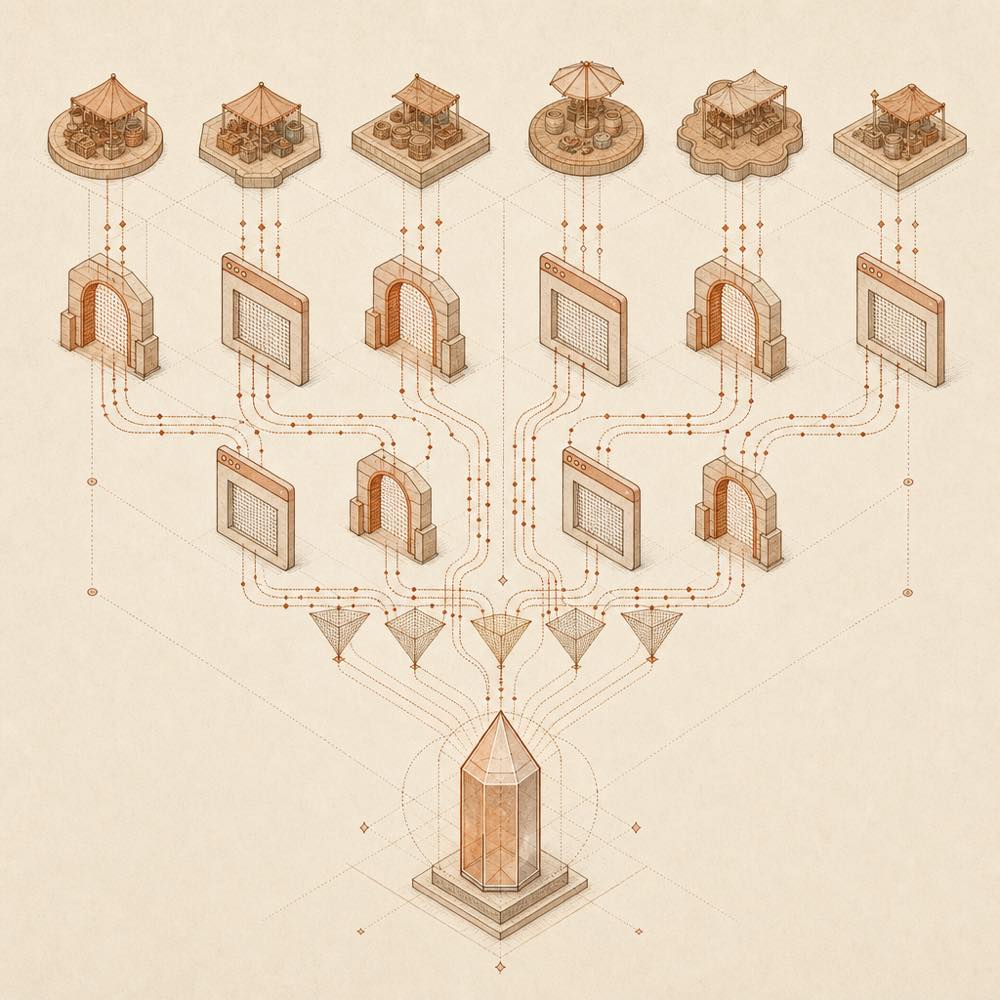
Abstract diagram of marketplace data streams passing through HTTP and browser gateways into one read-only prism.

ru-marketplace-mcp is a DeepSeek Harness plugin that provides read-only product and marketplace research across ten Russian marketplaces. Its 13 skills load when the plugin is installed, while its two optional MCP rows remain disabled until RU_MARKETPLACE_MCP_DIR points to a local clone of the repository.

The MCP implementation runs as console commands from that checkout, using Python 3.12+ and uv. It reads marketplace data through anonymous HTTP where available, or through the agent's own Chrome session over CDP for sources that require a browser. The repository exposes separate servers and a combined marketplace-mcp server; marketplace-mcp install claude prints client configuration, and marketplace-mcp doctor reports connector status. Data access is read-only. An optional MPStats connector reads paid account data when MPSTATS_MP_AUTH is supplied.

This plugin suits agents that need Russian-marketplace searches, product cards, reviews, seller details, stock information or price comparison. ru-marketplace-mcp is a poor fit when Python 3.12+ and uv cannot be provided, when a local repository checkout is not acceptable, or when the required browser session and network conditions are unavailable. Ozon, Avito, Taobao, Megamarket, DNS, Citilink and some Lamoda operations depend on Chrome; Taobao and Megamarket also require an active login, and Avito requires a Russian residential IP. The terminal surface matters because the plugin launches local uv commands and can reach the configured Chrome session with the agent's permissions.

ru-marketplace-mcp documentation

Configuration

The DSH integration uses the following setting:

Identifier Purpose
RU_MARKETPLACE_MCP_DIR Points the optional MCP rows at a local clone of ru-marketplace-mcp.
MPSTATS_MP_AUTH Optional paid MPStats mp_auth cookie/token. Without it, MPStats tools return auth_missing; other connectors are unaffected.

The two MCP rows are disabled until RU_MARKETPLACE_MCP_DIR is set. The upstream repository can also be configured as one combined MCP entry or as separate servers.

Commands

The repository requires its console commands to run from the checkout. marketplace-mcp mounts the marketplace connectors together and adds marketplace_sources, which reports which connectors started and why others failed. marketplace-mcp install claude prints a configuration block for Claude Desktop; accepted client names include claude, claude-code, cursor and dsh. marketplace-mcp doctor checks the current connector and session state.

The documented self-check is:

uv run python -c "import asyncio; from wb_connector.server import wb_selfcheck; print(asyncio.run(wb_selfcheck()).status)"

Requirements

The MCP checkout needs Python 3.12+ and uv. The documented Claude Desktop configuration file is %APPDATA%\Claude\claude_desktop_config.json on Windows and ~/Library/Application Support/Claude/claude_desktop_config.json on macOS. Its combined-server entry runs uv with run --directory <checkout> marketplace-mcp.

Behaviour and limits

Wildberries, Yandex Market, Detsky Mir and Lamoda cards can be read anonymously. Other sources use the agent's Chrome through CDP, with some requiring an active marketplace login. Avito needs a Russian residential IP and spaced requests; data-centre IPs are blocked. The connectors queue CDP calls with pauses. MPStats is the only paid source. The repository documents read-only access and no required API keys, tokens or registration for the ordinary sources.

Written from the project's own documentation and kept in sync with it. Where the two disagree, the source is authoritative — read the README on GitHub

Same category

Alternatives to ru-marketplace-mcp

treg

superdesigndev

452

Tool catalog for agents: search ~2,600 external endpoints (SEO and SERP, backlinks, social, people and company enrichment, ad libraries, scraping) by the task you want done, read each one's parameters and per-call price, then call it with the credential injected server-side. Ships the skill plus an MCP row that stays disabled until TREG_TOKEN is set.

Installed cleanly when we ran it

GitHub sourcePythonyesterday

AI review

treg

What it is — The treg plugin provides DeepSeek Harness agents with a tool catalog to search and call approximately 2600 external endpoints by task.

Who it is for — When using a DeepSeek Harness agent to perform data collection tasks requiring external tools without managing multiple vendor accounts, this plugin is suitable. Developers who only use local CLIs or self-built skills can from another angle achieve the needed functionality through direct configuration.

Watch out — Sandbox test passed: installed in a fresh profile and registered into the profile by Harness. No obvious pits found. Source installation requires manually allowing the build script.

The verdict — I would install it because it enables a DeepSeek Harness agent to access external tools with one token and server-side credential injection.

Generated by grok-4.6, and a starting point rather than a verdict. Where it says a plugin installs or does not, that is from a real run in a clean profile — everything else is read off the repository. Trust the source over this.Read the source
1Details
252

Chrome sidebar extension that lets DSH operate your browser directly, no vision capabilities required.

Installed cleanly when we ran it

GitHub sourceTypeScriptyesterday

AI review

dsh-browser

What it is — A Chrome sidebar extension that lets DSH operate your browser directly without vision capabilities.

Who it is for — When you want the model to operate in your actual browser to fill forms or navigate while preserving login state, you can use this plugin. It registers the DSH bundle in the web profile. If you only run DSH in terminal without browser control needs, you can skip this plugin.

Watch out — Installation requires manual approval of the build script from source. Sandbox testing passed, it registers in a fresh profile.

The verdict — I would install it because it enables model operation in a real browser session with preserved state.

Generated by grok-4.6, and a starting point rather than a verdict. Where it says a plugin installs or does not, that is from a real run in a clean profile — everything else is read off the repository. Trust the source over this.Read the source
1Details

notes

zhaoolee

144

Export DSH conversations as Smartisan Notes-style PNGs, or create and update Markdown notes in a configured account-scoped workspace.

Installed cleanly when we ran it

GitHub sourceTypeScriptyesterday

AI review

notes

What it is — Export DSH conversations to Smartisan Notes-style PNGs or create and update Markdown notes in an account-scoped workspace.

Who it is for — Users who want to organize conversation records with DeepSeek Harness and export them as notes for sharing are suitable for installing this plugin. If you mainly handle static documents rather than conversation records, you can skip installing this plugin.

Watch out — Successfully registered in the profile after installation. No obvious issues found.

The verdict — I would install it because it allows direct export of conversations into notes with a simple trigger in the DSH dialogue.

Generated by grok-4.6, and a starting point rather than a verdict. Where it says a plugin installs or does not, that is from a real run in a clean profile — everything else is read off the repository. Trust the source over this.Read the source
1Details

modsearch

liustack

133

Web search bridge for text-only agents: ask the web or X, get structured JSON evidence (search, fetch, citations).

Installed cleanly when we ran it

npm packageTypeScriptyesterday

AI review

modsearch

What it is — ModSearch provides web search, X search, and page fetching capabilities for text models in DeepSeek Harness.

Who it is for — When using DeepSeek-V4-Flash for tasks requiring up-to-date information, it supplements web search capabilities. If you use a model with native web access, it is not needed.

Watch out — Installation requires browser login for the default engine or free API keys from alternatives. Sandbox test passed: works in fresh profile and registered. The plugin executes shell commands. No obvious issues found.

The verdict — I would install it because of the free default engine and automatic failover support.

Generated by grok-4.6, and a starting point rather than a verdict. Where it says a plugin installs or does not, that is from a real run in a clean profile — everything else is read off the repository. Trust the source over this.Read the source
1Details

argo

taxueseek

98

Search built for agents: multilingual coverage across web, academic, code, shopping, finance, news, and encyclopedias.

Installs, but not as a profile layer

npm packagePython5d ago

AI review

argo

What it is — Argo is a multilingual search infrastructure for AI agents, delivering structured evidence candidates with credibility decomposition.

Who it is for — If you are developing AI agents using DeepSeek Harness to query topics like finance, sports, or movies requiring structured evidence support, it fits. If you seek only human-readable search summaries or link lists, you do not need it.

Watch out — Successfully installed via command, but treated as ordinary dependency without dsh.bundle so no profile layer added. No obvious issues found in sandbox testing.

The verdict — I would install it because it offers structured evidence for agents to reduce context bloat and costs, but as an ordinary dependency it will not add a profile layer and must be used as per its documentation.

Generated by grok-4.6, and a starting point rather than a verdict. Where it says a plugin installs or does not, that is from a real run in a clean profile — everything else is read off the repository. Trust the source over this.Read the source
1Details
70

Undo/redo & rollback system for DSH: every config change is auto-snapshotted; undo/redo/restore to any version from the WebUI or the offline CLI/GUI tools (works even when DSH fails to boot).

Installed cleanly when we ran it

GitHub sourceJavaScriptyesterday

AI review

dsh-undo-plugin

What it is — Provide snapshot and rollback functionality for DeepSeek Harness configuration and plugin code, with one-click reversion to any version via WebUI, CLI or offline GUI.

Who it is for — When frequently adjusting profile settings or plugin code in the DeepSeek Harness WebUI, this is suitable. It is not appropriate for users running simple local scripts only, as the plugin targets DeepSeek Harness configuration management.

Watch out — Tested successfully after installation into a fresh profile with harness registration. Static check indicates shell command execution. No obvious issues found.

The verdict — I would install it, as it handles offline recovery when DeepSeek Harness fails to boot, without requiring additional dependencies.

Generated by grok-4.6, and a starting point rather than a verdict. Where it says a plugin installs or does not, that is from a real run in a clean profile — everything else is read off the repository. Trust the source over this.Read the source
1Details