DSH Marketplace

TokenLedger

zh667/TokenLedger

Sidebar usage panel that attributes tokens to the relay site that served each request, read from your existing provider config: today/month/all-time totals, per-site and per-model breakdowns, a year activity heatmap, and New API / Sub2API / DeepSeek balances.

19918JavaScriptMITSource

Install

Add TokenLedger to DeepSeek Harness

Install into

via npm

Resolves a published tarball rather than cloning the repository, and installs without any extra setup. Swap `web` for your profile name if you run another one.

via GitHub · npm package

Installing from GitHub runs the project's build script, which pnpm blocks until you allowlist it — run the command once and pnpm prints the exact key to add under `allowBuilds` in ~/.dsh/profiles/web/pnpm-workspace.yaml.

What happened when we ran it

Installed cleanly when we ran it

Every command here is run in a throwaway container against a clean profile, and the result is whatever the harness recorded — not a guess from the source. Last run yesterdayon DeepSeek Harness 0.2.2-rc.5.

Show it in your README

install verified — dshmarketplace

For maintainers: the badge serves this listing's latest sandbox verdict, so a re-run updates it on its own — and it links readers to the full result here.

Due diligence

Before you install TokenLedger

  • Source of record: zh667/TokenLedger — present in the community registry that DSH's own plugin market installs from.
  • Licensed under MIT.

Security

What installing TokenLedger runs

Build scripts

No build script was blocked in our run.

Source: our sandbox install on DeepSeek Harness 0.2.2-rc.5, yesterday.

Install hooks

package.json declares no preinstall, install or postinstall script.

Source: package.json on GitHub, read at our last sync. prepare is not recorded; it runs only on a GitHub install, and shows up under build scripts when pnpm blocks it.

README mentions

shell commands (bash, exec, spawn …)

Source: a keyword match on the README — a hint about what the plugin touches, not an analysis of its code.

Not an audit. These are the record of one install and two text scans; nobody has read this plugin's code on your behalf. Plugins run with your agent's permissions.

The AI take

What it is — A DSH web sidebar that groups token spend by relay origin and model, with period totals, a year heatmap, and balances from accounts already in provider config.

Who it is for — You run an agent in DSH web, mixing official DeepSeek with New API or Sub2API in the same day, and you still leave the editor to learn which origin served the call and whether the wallet can take another run. Someone who signs off a single official DeepSeek invoice is keeping a different book than an origin-level split.

Watch out — It installed into a fresh profile and harness registered it. A running dsh web needs a restart and a browser hard refresh; pinning a revision takes the full 40-character commit SHA or resolution fails. OpenRouter credit readout wants a Management Key, and install executes shell commands.

The verdict — Yes. Worth is the split token book; a cost figure I would have to back with my own rates does not enter the decision.

Generated by grok-4.6, and a starting point rather than a verdict. Where it says a plugin installs or does not, that is from a real run in a clean profile — everything else is read off the repository. Trust the source over this.

What TokenLedger does

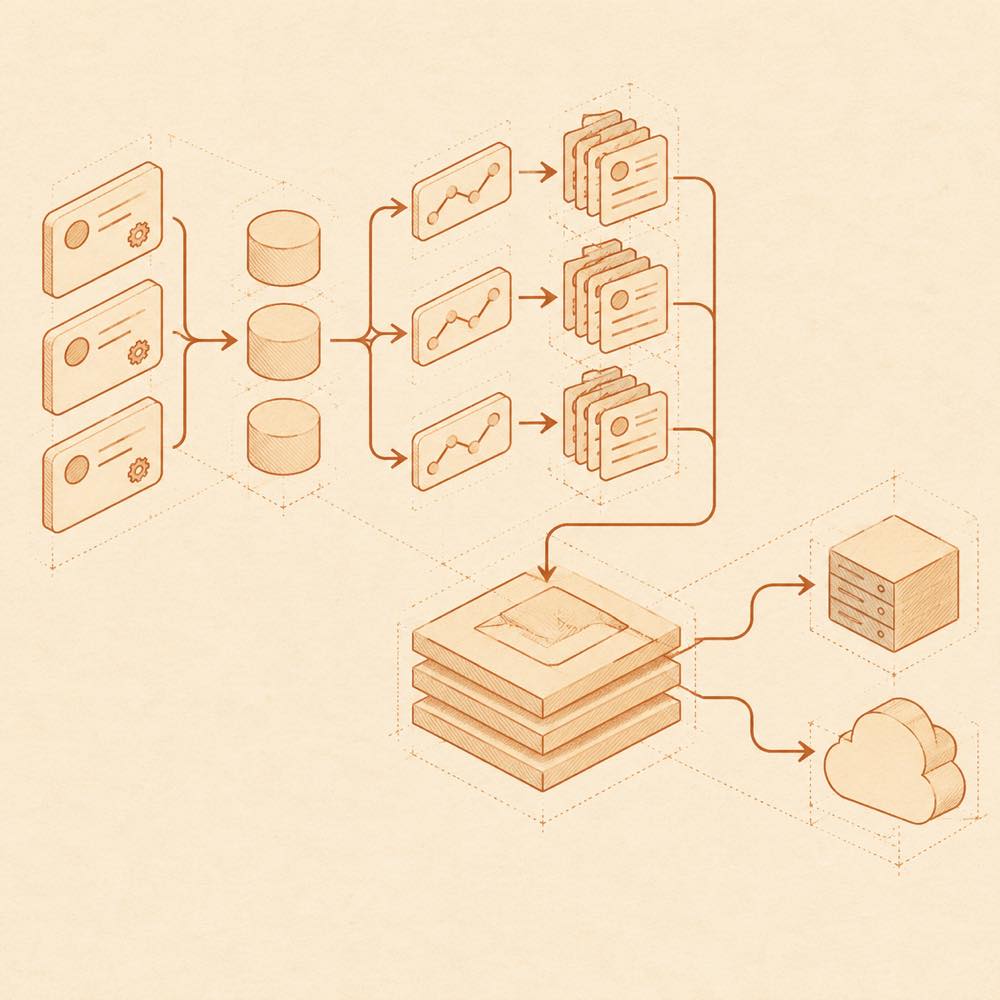
Provider records and session paths converge into a usage index, with separate arrows for balance queries.

TokenLedger is a DeepSeek Harness plugin that records token usage and attributes each request to the relay site that served it.

TokenLedger reads the existing provider configuration, normalises each provider’s baseURL to an origin, and combines keys for the same relay into one site. It also groups usage by the session’s starting directory and can show provider and model breakdowns, today/month/all-time totals, cache-hit rates, a yearly activity heatmap, estimated costs, balances, and rolling subscription quotas. The aggregation is host-owned and shared by the web panel and command-line queries. TokenLedger maintains an index containing aggregated records such as (sessionId, day, site, provider, model); it does not read prompts, tool parameters, or response bodies. Balance checks use the provider’s configured apiKeyEnv, with OpenCode Go also able to read ~/.local/share/opencode/auth.json.

TokenLedger is for developers who need usage attribution across relay sites and projects without adding another set of credentials. It requires the DeepSeek Harness web profile and adds a terminal command surface, including /tokenledger export, /tokenledger diagnostics, and /tokenledger reindex. The terminal access is used for these commands, while balance and custom-endpoint features can send authenticated GET requests to configured provider origins. It is not the right choice when usage accounting is unnecessary, when the web profile is unavailable, or when sending balance queries to provider services is unacceptable.

TokenLedger documentation

Requirements and integration

DeepSeek Harness loads TokenLedger in the web profile. The README requires @deepseek-ai/dsh >= 0.1.0-rc.6. DeepSeek Harness exposes the plugin through the web sidebar and its command surface; restart dsh web after installation before refreshing the browser.

TokenLedger reads provider settings and uses only each provider’s baseURL for relay discovery. Credentials remain in the provider configuration. Its aggregation index records usage by session, day, site, provider, and model. The README does not specify the index file path.

Configuring TokenLedger

No configuration is normally required. Add overrides to the existing settings.yaml; changes are hot-reloaded.

Key Purpose
tokenledger.relays Maps a route name to a relay URL when automatic discovery cannot find it.
tokenledger.rates Supplies rate buckets, effective dates, and peak/off-peak pricing for cost estimates. The default is []; unpriced models show —.
tokenledger.fingerprint Controls relay fingerprint probing. The default is false; the first balance query can probe automatically.
tokenledger.endpoints Declares a fallback balance endpoint for a configured provider origin.

Custom endpoints accept origin, displayName, path, fields, and windows. path must be an absolute single-slash path. TokenLedger sends only GET, does not follow cross-origin redirects, applies response-size and timeout limits, and reads the key from the matched provider’s apiKeyEnv. raw is available where the endpoint requires an unprefixed key.

TokenLedger commands

DeepSeek Harness registers these commands:

  • /tokenledger [days] [site] queries all time or a day range, optionally filtered by site.
  • /tokenledger site lists discovered relays; site add <route> <address> and site rm <route> manage overrides.
  • /tokenledger export csv 30 exports data; export json is also supported.
  • /tokenledger diagnostics reports index health and unattributed rows.
  • /tokenledger reindex discards the index and rebuilds it.

Supported account queries

Built-in balance or quota readers cover DeepSeek, New API variants, Sub2API, Moonshot/Kimi, GLM/Z.ai, OpenRouter, OpenCode Go, Kimi For Coding, MiniMax Coding Plan, and Z.ai Coding Plan. OpenRouter requires a Management Key; other listed providers use the key configured for the route. ~/.local/share/opencode/auth.json is an additional fallback for OpenCode Go when no apiKeyEnv is configured.

Written from the project's own documentation and kept in sync with it. Where the two disagree, the source is authoritative — read the README on GitHub

Same category

Alternatives to TokenLedger

dsh-context

bowenliang123

3.1k

DSH context insight panel: Context dashboard + /context command + Context browser — one-stop context lifecycle management with categorized composition, content details, evolution trends, compaction/injection events, and stats.

Installed cleanly when we ran it

npm packageTypeScript1mo ago

AI review

dsh-context

What it is — Adds context dashboards to DeepSeek Harness: composition, trends, compaction/injection events, cross-session usage, an agent-family view, and /context.

Who it is for — You run long, tool-heavy DeepSeek jobs with subagents in DeepSeek Harness and cannot tell whether system, tools, or chat is filling the window, or which request compacted. Skip it if Harness is only a worker whose token metrics already land in your own pipeline.

Watch out — A clean-profile install was registered by the harness. Cost uses models.dev list prices; DeepSeek peak is 2× the listed off-peak rate, so the figures are not an invoice.

The verdict — The extra tabs are noise I can live with; I will not reconstruct token mix from session logs.

Generated by grok-4.6, and a starting point rather than a verdict. Where it says a plugin installs or does not, that is from a real run in a clean profile — everything else is read off the repository. Trust the source over this.Read the source
Details

dsh-cost-meter

Han-1413141

445

Per-session and daily API cost, budget with usage %, official balance, history dashboard, and one-click official price sync with peak/off-peak pricing.

Installed cleanly when we ran it

npm packageJavaScript1mo ago

AI review

dsh-cost-meter

What it is — Surfaces live session and daily API spend, budget fill, official balance and a history board on the DeepSeek Harness web GUI, plus a one-click pull of official peak/off-peak prices.

Who it is for — You are coding in the DeepSeek Harness web GUI on official DeepSeek metered tokens or a vendor Coding Plan (Anthropic, Kimi, MiniMax and the rest), and the UI currently does not show this chat’s bill, cash left on the official account, or whether the clock is peak-priced. Skip it if the host still runs DSH 0.1.x: the declared floor is 0.2.0, and that line is dropped.

Watch out — A clean-profile install completed and the harness registered it into the profile. Fully restart DSH after every update; a Ledger is busy message at startup hides the cost widgets until the ledger lock is recovered. On DSH 0.2.1-rc.x, pnpm supply-chain rules can fail install or uninstall, and the plugin does run shell commands.

The verdict — I would add it on a DSH that mixes official pay-as-you-go with a Coding Plan, for split books between quota and cash—not for a second session total.

Generated by grok-4.6, and a starting point rather than a verdict. Where it says a plugin installs or does not, that is from a real run in a clean profile — everything else is read off the repository. Trust the source over this.Read the source
1Details
276

Tracks DeepSeek token usage, per-call and session costs, and account balance with cache-aware charge animations in the DSH Web UI.

Installed cleanly when we ran it

npm packageJavaScript26d ago

AI review

dsh-damage-pulse

What it is — dsh-damage-pulse is a DeepSeek Harness plugin that tracks DeepSeek token usage, per-call and session costs, and account balance.

Who it is for — Users who use DeepSeek models in DeepSeek Harness for conversations need to know token usage and costs. Users who do not use DeepSeek models can consider it from a different perspective.

Watch out — Sandbox testing passed when installed in a fresh profile and registered with harness. It executes shell commands. No obvious issues found.

The verdict — I would install it because it tracks DeepSeek token usage in the DSH Web UI.

Generated by grok-4.6, and a starting point rather than a verdict. Where it says a plugin installs or does not, that is from a real run in a clean profile — everything else is read off the repository. Trust the source over this.Read the source
1Details

dsh-usage-stats

Ychris12138

179

Multi-provider usage dashboard with provider/model token breakdowns, calendar drill-downs, account balances, and OpenCode Go / Z.ai subscription quota tracking.

Installed cleanly when we ran it

npm packageJavaScript1mo ago

AI review

dsh-usage-stats

What it is — dsh-usage-stats provides multi-provider account monitoring and token usage analytics for the DeepSeek Harness web GUI.

Who it is for — When using DeepSeek Harness web profile for multi-provider token usage analysis and account balance monitoring, it is suitable to install. If a user only needs to analyze token usage for a single provider without cross-provider data aggregation, they can monitor using other methods.

Watch out — Requires providing API key or token to fetch account data. Sandbox testing passed: installed in a fresh profile and registered by Harness. Will execute shell commands.

The verdict — If multi-provider token usage and balance analysis is needed, I would install it because it offers fee estimation and budget alerts, but the premise is that credentials are provided.

Generated by grok-4.6, and a starting point rather than a verdict. Where it says a plugin installs or does not, that is from a real run in a clean profile — everything else is read off the repository. Trust the source over this.Read the source
2Details

dsh-usage

Aisland-SJL

125

🌊 Persistent dock & fully-customizable balance/usage panel for DeepSeek Harness — activity heatmap, dual-channel comparison, local-only & privacy-first

Installed cleanly when we ran it

GitHub sourceJavaScript1mo ago

AI review

dsh-usage

What it is — It provides a persistent dock, token usage panel, and activity heatmap.

Who it is for — When managing token usage in DeepSeek Harness web profile, if you need real-time balance monitoring and custom interface layout, this plugin fits. If you only need simple statistics without cross-channel comparison, you can skip installing it.

Watch out — Sandbox test passed: installed in fresh profile and registered by harness. The plugin runs locally only with credentials not exposed. No obvious issues found.

The verdict — I would install it because it integrates multiple widgets into a single persistent dock, but the premise is that the profile version matches.

Generated by grok-4.6, and a starting point rather than a verdict. Where it says a plugin installs or does not, that is from a real run in a clean profile — everything else is read off the repository. Trust the source over this.Read the source
1Source
115

Personal center for DeepSeek Harness: cross-session usage statistics with per-provider and per-model breakdown (auto-discovers configured models), per-model cost estimation, global custom instructions, a data-driven desktop pet with bitmap & vector skins, and a conversation status overview, all local and offline.

Installed cleanly when we ran it

npm packageJavaScript21d ago

AI review

dsh-personal-center

What it is — DeepSeek Harness plugin adds a personal configuration section with token usage statistics, personalized custom instructions and a desktop pet.

Who it is for — If you need to view token usage and model distribution in DeepSeek Harness, then this plugin is suitable for you. If you do not use the workspace instruction feature in DeepSeek Harness, then you do not need to install it.

Watch out — Sandbox testing passed. It was installed and registered in a new profile. No obvious issues found.

The verdict — I would install it because it provides model cost estimation and a usage-driven desktop pet, but only if token usage tracking is needed.

Generated by grok-4.6, and a starting point rather than a verdict. Where it says a plugin installs or does not, that is from a real run in a clean profile — everything else is read off the repository. Trust the source over this.Read the source
Source