DSH Marketplace

dsh-mobile-plugin

WNLUO/dsh-mobile-plugin

The DeepSeek Harness app lets you use the DeepSeek Harness on this computer or server from your phone. Phones and tablets both work, on Android and iOS. On your phone you can keep chatting, look at files and manage plugins, and the machine you are using can also connect to DeepSeek Harness on your other machines and open each one separately.

2409JavaScriptMITSource

Install

Add dsh-mobile-plugin to DeepSeek Harness

Install into

via npm

Resolves a published tarball rather than cloning the repository, and installs without any extra setup. Swap `web` for your profile name if you run another one.

via GitHub · npm package

Installing from GitHub runs the project's build script, which pnpm blocks until you allowlist it — run the command once and pnpm prints the exact key to add under `allowBuilds` in ~/.dsh/profiles/web/pnpm-workspace.yaml.

What happened when we ran it

Installed cleanly when we ran it

Every command here is run in a throwaway container against a clean profile, and the result is whatever the harness recorded — not a guess from the source. Last run yesterdayon DeepSeek Harness 0.2.2-rc.5.

Show it in your README

install verified — dshmarketplace

For maintainers: the badge serves this listing's latest sandbox verdict, so a re-run updates it on its own — and it links readers to the full result here.

Due diligence

Before you install dsh-mobile-plugin

  • Source of record: WNLUO/dsh-mobile-plugin — present in the community registry that DSH's own plugin market installs from.
  • Licensed under MIT.

Security

What installing dsh-mobile-plugin runs

Build scripts

No build script was blocked in our run.

Source: our sandbox install on DeepSeek Harness 0.2.2-rc.5, yesterday.

Install hooks

package.json declares no preinstall, install or postinstall script.

Source: package.json on GitHub, read at our last sync. prepare is not recorded; it runs only on a GitHub install, and shows up under build scripts when pnpm blocks it.

README mentions

shell commands (bash, exec, spawn …)

Source: a keyword match on the README — a hint about what the plugin touches, not an analysis of its code.

Not an audit. These are the record of one install and two text scans; nobody has read this plugin's code on your behalf. Plugins run with your agent's permissions.

What dsh-mobile-plugin does

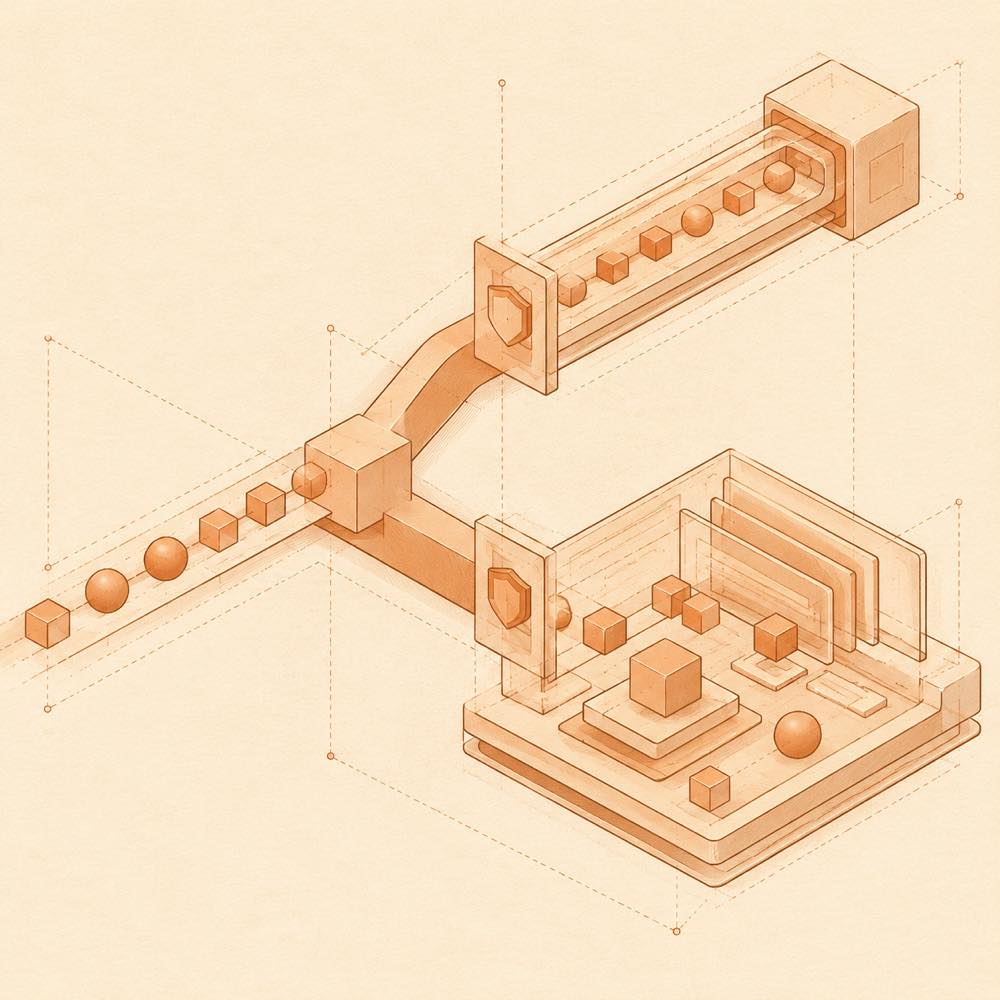
Encrypted streams pass through a relay into paired workspaces and a remote machine.

dsh-mobile-plugin is a DeepSeek Harness plugin that lets an Android or iOS phone or tablet connect to a DeepSeek Harness instance running on a computer or server. DeepSeek Harness loads the plugin as a web-profile extension; the plugin registers a local control panel and the /api/mobile/v1/* mobile API, then exposes selected session, workspace, file, approval, Git, model, scheduling and plugin-management operations to the mobile app. Connections can use a relay v2 tunnel or a direct local-network connection. The local-network listener uses port 18787 by default, while pairing, address reporting and device permissions are configured from DeepSeek Harness settings.

The app communicates with the paired machine rather than a hosted AI service. With the full permission profile, the mobile connection can install plugins and arbitrary npm packages, read and write registered workspace paths, and change model and channel settings. approve allows session and file access plus approval actions, while readonly limits access to viewing sessions and files. Protocol v2 encrypts requests and responses using keys derived from deviceKey; relay infrastructure forwards ciphertext, although old clients and the session/workspace mirror snapshots have different handling.

This is intended for operators who need to monitor or continue work away from the computer, or connect to another computer running DeepSeek Harness. It is a poor fit when mobile access is unnecessary, when exposing file and configuration controls is unacceptable, or when a shell is required: the mobile API deliberately does not expose shell, system settings or arbitrary file writes. The plugin still reaches the host’s terminal-related operational surface through actions such as Git, workspace file transfer, plugin installation and model configuration.

dsh-mobile-plugin documentation

Configuring dsh-mobile-plugin

DeepSeek Harness exposes the plugin configuration page at Settings → Mobile. That page provides pairing QR codes, the current listening address and relay status. The plugin supports relay v2 for public-network access and local-network direct connections. Local access uses port 18787 by default; existing port settings are retained. Enable fixed port when an external tunnelling tool depends on a stable port. The plugin can also preserve manually entered fixed addresses and tunnel settings.

Pairing supports selectable policies and independent device credential revocation. The documented permission profiles are:

Profile Access
full Install plugins and arbitrary npm packages; read and write registered workspace paths; change model and channel configuration
approve View sessions and files; approve permission requests and questions; no direct file writes or configuration changes
readonly View sessions and files only

Commands and API

DeepSeek Harness serves the mobile endpoint namespace /api/mobile/v1/*. The README does not document a separate plugin command surface. The mobile API supports session and workspace operations, streaming events, approvals, queued interjections, Git status and changes, file browsing and upload, plugin management, model and channel selection, scheduled tasks, and sub-agent control. Uploaded files are placed in a fixed receiving directory.

How dsh-mobile-plugin behaves

The plugin can report the current address to a control service when address reporting is enabled. The app checks a changed entry point and reconnects; it also refreshes the latest snapshot when returning to the foreground or reconnecting. Session-list and workspace mirror snapshots may be cached through the relay for frequent reads. iOS offline notifications are optional.

DeepSeek Harness can also use the plugin to bind a computer temporarily and open that computer’s full web interface from another computer. The temporary access lasts one hour and can renew automatically.

Security and limits

Protocol v2 derives per-session keys from deviceKey and encrypts requests and responses before signing them. Old protocol clients remain unencrypted. The mobile API does not expose shell, system settings or arbitrary file writes, but full pairing still permits significant host changes. Automatic plugin updates are enabled by default and can be disabled in the plugin panel.

Written from the project's own documentation and kept in sync with it. Where the two disagree, the source is authoritative — read the README on GitHub

Same category

Alternatives to dsh-mobile-plugin

dsh-ssh

zhu1090093659

11k

SSH ops panel for DSH: web terminal, SFTP transfer with progress, local port forwarding, and one-command cluster execution across hosts; agents share the same host config.

Installed cleanly when we ran it

npm packageTypeScripttoday

AI review

dsh-ssh

What it is — Puts an in-browser SSH terminal, SFTP with a progress bar, local port forwards, and multi-host batch commands into DSH.

Who it is for — You run DeepSeek-V3 or DeepSeek-R1 agents inside DSH that must log into remote Linux boxes to debug, move files, or type in a shell, and stock dsh web has no remote-ops surface. Leave it out if those hosts already live in a jump box or a standalone SSH client and you have no plan to fold that workflow into DSH.

Watch out — The sandbox only confirmed a clean-profile install that DSH registered. It never opened a real SSH session, SFTP transfer, port forward, or cluster run. No install-level snag showed up.

The verdict — The shared host list is the reason I would add it: one inventory for me and the agents, not a second copy outside DSH.

Generated by grok-4.6, and a starting point rather than a verdict. Where it says a plugin installs or does not, that is from a real run in a clean profile — everything else is read off the repository. Trust the source over this.Read the source
1Details

dsh-ssh

zhu1090093659

10k

SSH ops panel for DSH: web terminal, SFTP transfer with progress, local port forwarding, and one-command cluster execution across hosts; agents share the same host config.

Installed cleanly when we ran it

npm packageTypeScript9d ago

AI review

dsh-ssh

What it is — A DSH panel for an in-browser SSH shell, SFTP with progress, local port forwarding, and one command run across many hosts.

Who it is for — You have DSH agents changing configs, moving files, or debugging a live Linux service, and stock dsh web has no remote-ops surface. Leave it if the work stays in a local repo plus chat, and every server is handled by tools that never touch DSH.

Watch out — A blank-profile install succeeded and DSH registered it into that profile. No obvious traps.

The verdict — I'll add it. One host list for the panel and the agents is the part I will not keep in two places.

Generated by grok-4.6, and a starting point rather than a verdict. Where it says a plugin installs or does not, that is from a real run in a clean profile — everything else is read off the repository. Trust the source over this.Read the source
1Details

dsh-remote-web-ui

zhu1090093659

10k

Remote control of a dsh web workspace from phone or PC: QR-code pairing through a token-gated channel, SSE real-time sync, and separate mobile and full desktop GUI modes.

Installed cleanly when we ran it

npm packageTypeScript9d ago

AI review

dsh-remote-web-ui

What it is — Drive a local dsh web workspace from a phone or another PC after QR pairing on a token-gated channel, keep both sides current over SSE, and use either a mobile GUI or a full desktop GUI.

Who it is for — A DeepSeek model is already chewing a long agent job in local dsh web and you need that same workspace in your hand when you leave the desk. If every turn happens in the host machine's own browser and a second device is never part of the loop, skip it.

Watch out — Sandbox install on a fresh profile succeeded and DeepSeek Harness registered it into the profile. It executes shell commands. No obvious pitfalls showed up.

The verdict — I spend the slot on a pocket screen for a workspace that already exists, not on a new place to start work.

Generated by grok-4.6, and a starting point rather than a verdict. Where it says a plugin installs or does not, that is from a real run in a clean profile — everything else is read off the repository. Trust the source over this.Read the source
1Details
1.9k

Multi-device remote access for DeepSeek Harness and supported coding workspaces through an end-to-end encrypted channel, with adaptive Relay/WebRTC transport, device authorization, workspace files, read-only previews, terminals, and optional Codex Remote.

Installed cleanly when we ran it

npm packageTypeScript18d ago

AI review

ds-harness-remote

What it is — Brings a running DeepSeek Harness session, plus Codex or Cursor workspaces, onto a phone, browser, or second PC over an end-to-end encrypted channel.

Who it is for — Models and the project are already set up in DeepSeek Harness on the office machine, you have left, and you need those same workspace files, read-only previews, and terminals on the phone or browser you are holding. Skip it when the only dev box is the one you carry; there is no Host left behind.

Watch out — It installed on a fresh profile and DeepSeek Harness registered it. You need to supply an API key or token first. iOS remains TestFlight-only; the Chrome extension only mints a device credential and lists online Hosts, and does not host a chat UI.

The verdict — I'd put it in: the Host never has to listen on a public port, which I will not set up myself; the token stays on a box I can cut power to.

Generated by grok-4.6, and a starting point rather than a verdict. Where it says a plugin installs or does not, that is from a real run in a clean profile — everything else is read off the repository. Trust the source over this.Read the source
1Details

dsh-mobile

saya-ch

971

Access DeepSeek Harness from the Android app or a mobile browser with secure LAN and remote connections, persistent device pairing, and a customizable mobile interface.

Installed cleanly when we ran it

npm packageTypeScripttoday

AI review

dsh-mobile

What it is — DSH Mobile allows mobile browsers and Android apps to securely access DeepSeek Harness via LAN or remote connections while synchronizing sessions and workspaces.

Who it is for — If you want to use DeepSeek Harness for dialogue and tool operations on an Android device, dsh-mobile is suitable. If you primarily use DeepSeek Harness on the desktop, you don't need to install it.

Watch out — Sandbox testing passed: after installation in a new profile, it was registered by harness. It executes shell commands. No obvious issues found.

The verdict — I would install it because it supports persistent device pairing for mobile access to DeepSeek Harness.

Generated by grok-4.6, and a starting point rather than a verdict. Where it says a plugin installs or does not, that is from a real run in a clean profile — everything else is read off the repository. Trust the source over this.Read the source
1Details

Multi-device remote access for DeepSeek Harness: continue an active session from your phone, tablet, browser, or another computer over an end-to-end encrypted channel (Noise IK + adaptive relay/WebRTC transport), with device authorization, ApiProxy-only remote capabilities, and read-only file preview via dsh-file-viewer — no shell, remote desktop, or write access.

Installed cleanly when we ran it

GitHub sourceTypeScript28d ago

AI review

deepseek-harness-remote

What it is — Joins a phone, browser, or second computer to the DeepSeek Harness session that is already running on your Host, over an end-to-end encrypted channel.

Who it is for — A DeepSeek model job is live on the office tower—workspaces and tools already wired—and you still need that exact thread after you walk away. If the only Harness you use already sits in the backpack that leaves with you, remote access is not the missing piece.

Watch out — A fresh profile install completed and DeepSeek Harness registered the plugin. You must supply an API key or token; setup runs shell, and the Linux script path runs the Host as root. The catalog text (ApiProxy-only, read-only preview, no shell or writes) does not match the README list of remote terminals and dev-service previews—trust the live session; iOS is still unreleased TestFlight.

The verdict — Worth it on a machine that never sleeps. I am not putting DeepSeek Harness on a public listener just to peek at a session from the couch.

Generated by grok-4.6, and a starting point rather than a verdict. Where it says a plugin installs or does not, that is from a real run in a clean profile — everything else is read off the repository. Trust the source over this.Read the source
2Details